Evidence note: Models Desk implementation guide as of 2026-08-18. This article is a practical desk synthesis, not a benchmark report; verify model versions, vector database APIs, and pricing against your own stack before shipping.
Quick answer
To build a RAG app, do not start with the chatbot UI. Start with a closed retrieval loop: parse documents into clean text, chunk them with stable IDs, embed chunks with a pinned model, store vectors with metadata, retrieve top-k evidence for a frozen set of questions, and inspect whether the retrieved chunks actually contain the answer. Only after retrieval passes should you add the LLM answer layer. Most bad RAG apps fail before generation: messy parsing, unstable chunking, weak metadata, or no retrieval smoke tests.
Key takeaways
- Treat RAG as four systems: ingestion, retrieval, prompt assembly, and answer review.
- Use stable document IDs and chunk IDs from day one; retrofitting observability later is painful.
- Chunking is not a styling choice. It controls recall, context quality, and hallucination pressure.
- Pin your embedding model and log the version; silent embedding changes can make old vectors stale.
- Ship only after a frozen smoke set proves that the right sources are retrieved before the answer is generated.

Who this guide is for
- Engineers building a first production-minded RAG prototype over docs, policies, help-center pages, PDFs, or internal knowledge bases.
- PMs who need to review whether a RAG demo is real or just a chat UI over weak retrieval.
- Founders deciding what to build before buying a managed search or agent platform.
- Teams that already understand basic LLM prompting and now need reliable grounding.
Who should skip
- If your corpus is tiny and stable, a plain prompt with curated context may be enough.
- If your documents are mostly tables, scans, or complex legal exhibits, solve parsing/OCR first.
- If you need audited financial, medical, or legal answers, RAG alone is not enough; add review workflows and compliance gates.
- If you only want model comparison, start with how to read AI leaderboards instead.
The minimum RAG architecture
A minimum viable RAG app has eight moving parts:
| Layer | What it does | Common tool choices | Failure mode |
|---|---|---|---|
| Document loader | Finds files and assigns stable source IDs | Filesystem, S3, CMS export, crawler | Duplicate docs, missing metadata |
| Parser | Turns files into clean text | Markdown/HTML parser, PDF extractor, OCR | Headers, footers, tables, or footnotes pollute chunks |
| Chunker | Splits text into retrievable units | Token-aware splitter, heading-aware splitter | Answer spans split across chunks |
| Embedding job | Converts chunks into vectors | OpenAI, Cohere, Voyage, local embedding model | Unpinned model version, mismatched dimensions |
| Vector store | Stores vectors and metadata | pgvector, Qdrant, Weaviate, Pinecone, Chroma | No filters, weak IDs, no reindex path |
| Retriever | Returns top-k candidate chunks | Vector search, hybrid search, reranker | High-score irrelevant chunks |
| Prompt assembler | Packs evidence into context | Template + citation schema | Context overflow, missing citations |
| Answer reviewer | Checks citations and refusal behavior | Human review, rubric, eval set | Fluent answer with weak evidence |
For deeper chunking choices, pair this guide with RAG chunking and embedding model choice. For evaluation design, read evaluate retrieval: recall and faithfulness.
Step 1: define the corpus and answer boundary
Before loading documents, write the answer boundary in one paragraph. Example:
This RAG app answers questions about public product documentation and support policies. It must cite source documents. If the answer is not in the retrieved context, it should say it does not know and suggest the closest source.
This boundary prevents a common failure: teams build a general assistant when they only need grounded retrieval over a specific corpus. The narrower the boundary, the easier the first system is to test.
Step 2: parse documents into clean text
Parsing is not boring plumbing. It decides what the embedding model sees. If your parser includes navigation text, cookie banners, duplicated headers, or PDF line breaks, your vector database will faithfully store garbage.
Minimum parser output should include:
source_id: stable document identity, such aspricing-guide.md.source_url: canonical URL or file path for citations.title: page or document title.section_path: heading trail, such asBilling / Refunds / Annual plans.text: cleaned body text only.updated_at: source freshness timestamp when available.
Step 3: chunk with stable IDs
A practical starting point is 500-900 tokens per chunk with 80-150 tokens of overlap. That is not universal. Dense legal text, API references, tables, and tutorials may need different treatment. The real rule: chunk by meaning first, token count second.
Use deterministic IDs. A chunk ID like doc:pricing-guide.md#chunk-0038 is more useful than a random UUID when debugging. It lets you inspect which source failed and whether reindexing changed the chunk boundary.
Step 4: embed and upsert with a smoke test
After embedding, run a retrieval smoke test before building the answer UI. A passing run should show how many files were parsed, how many chunks were created, which embedding model was used, and whether a known query retrieves the expected source.
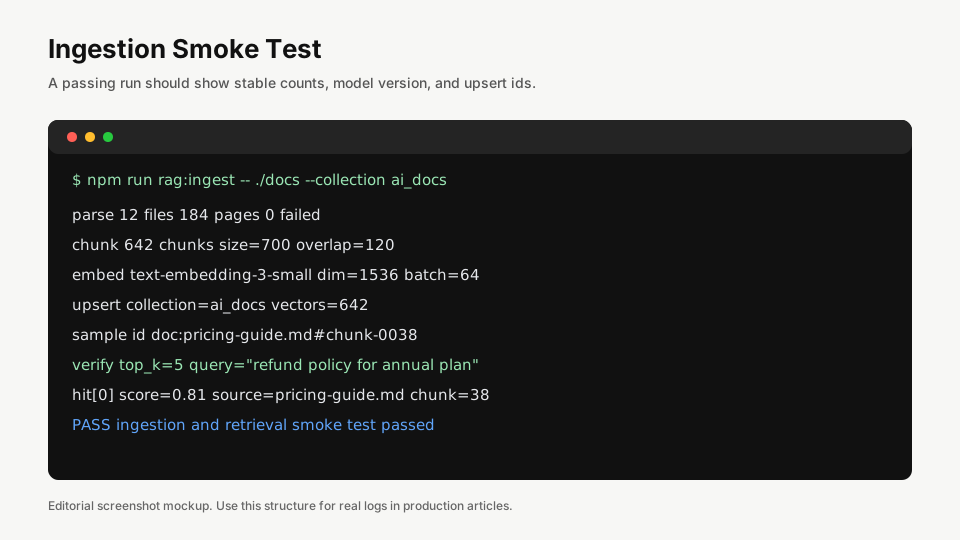
In your real logs, store at least:
- Embedding model name and dimension
- Chunk count by source
- Failed parse count
- Vector collection name
- Upsert timestamp
- Sample query and expected source
Step 5: inspect retrieval before generation
Do not ask “does the answer look good?” before asking “did retrieval find the right evidence?” The answer layer can hide retrieval failure by sounding confident. Inspect top-k chunks directly.

For each smoke question, record:
- Question
- Expected source document
- Expected section or chunk
- Top-k retrieved sources
- Whether the correct source appears in top 3 or top 5
- Whether the retrieved text contains enough evidence to answer
Step 6: assemble prompts with citations
Once retrieval passes, assemble the answer prompt. Keep the prompt boring. The model should know the role, the source rules, and the refusal rule. Example policy:
- Answer only from provided context.
- Cite source IDs after claims.
- If context is insufficient, say so.
- Do not invent policy, pricing, or legal terms.
- Prefer concise answers unless the user asks for detail.
This is where many RAG systems become too clever. Long persona prompts cannot repair bad retrieval. Start with a small prompt, then tune only after the retrieval set is stable.
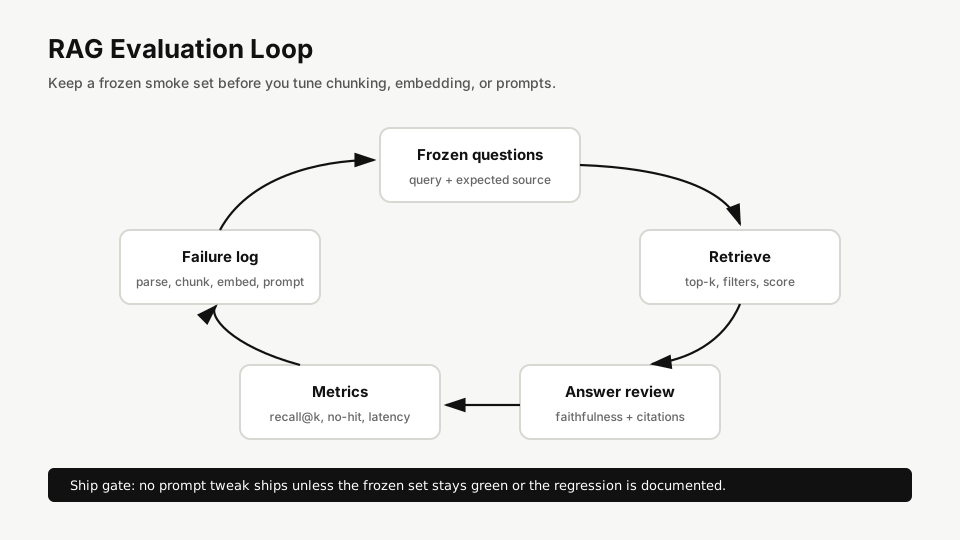
Step 7: run an evaluation loop
A frozen evaluation set prevents accidental regression. It does not need to be huge at first. Start with 20-50 questions that represent real user tasks. Each question should have an expected source and a judgment rubric.
Failure table
| Symptom | Likely layer | Debug check | Fix |
|---|---|---|---|
| Answer cites wrong document | Retrieval | Inspect top-k chunks | Add metadata filters, improve chunk headings, or use reranking |
| Answer is fluent but unsupported | Prompt / review | Check whether source IDs are required | Force citation rule and refusal behavior |
| Relevant source never appears | Parsing / chunking | Search source text before embedding | Fix parser or split by headings |
| Old policy keeps appearing | Index freshness | Compare source updated_at to vector timestamp | Implement delete-and-reindex by source ID |
| Latency too high | Retrieval / model | Break down parse, search, rerank, generation time | Cache frequent queries, reduce top-k, or move reranker behind threshold |
| Costs spike | Embedding / generation | Log tokens and batch sizes | Batch embeddings, cap context, and avoid re-embedding unchanged docs |
Recommended first build order
- Pick 10-20 representative documents.
- Write the answer boundary and refusal policy.
- Parse into clean text with source metadata.
- Chunk with deterministic IDs.
- Embed with a pinned model.
- Upsert into a vector store with metadata filters.
- Create 20 smoke questions with expected sources.
- Inspect retrieval results directly.
- Add prompt assembly and citations.
- Only then build the chat UI.
FAQ
What is the fastest way to build a RAG app?
The fastest safe path is to build ingestion and retrieval first, then add generation. A fast chat UI over untested retrieval will waste time later.
What chunk size should I use for RAG?
Start around 500-900 tokens with overlap, then tune against a frozen question set. Dense documents, tables, and code may need custom splitting.
Should I use vector search or hybrid search?
Use vector search for semantic similarity and consider hybrid search when exact terms, product names, policy IDs, or acronyms matter. Many production systems use both.
How do I know if retrieval is good enough?
Check whether expected sources appear in top 3 or top 5 for real questions. Then judge whether the retrieved text contains enough evidence to answer without guessing.
What should I read next?
Read RAG chunking and embedding model choice, then evaluate retrieval: recall and faithfulness.
Final checklist
- Every chunk has a stable ID and source URL.
- Embedding model and vector dimension are logged.
- Top-k retrieval is inspectable before generation.
- A frozen smoke set exists before prompt tuning.
- Answers cite sources and refuse unsupported claims.
- Reindexing can delete stale chunks by source ID.
A RAG app is not a chatbot with a vector database attached. It is a retrieval system with a language interface. Build the retrieval system first.