
Quick answer
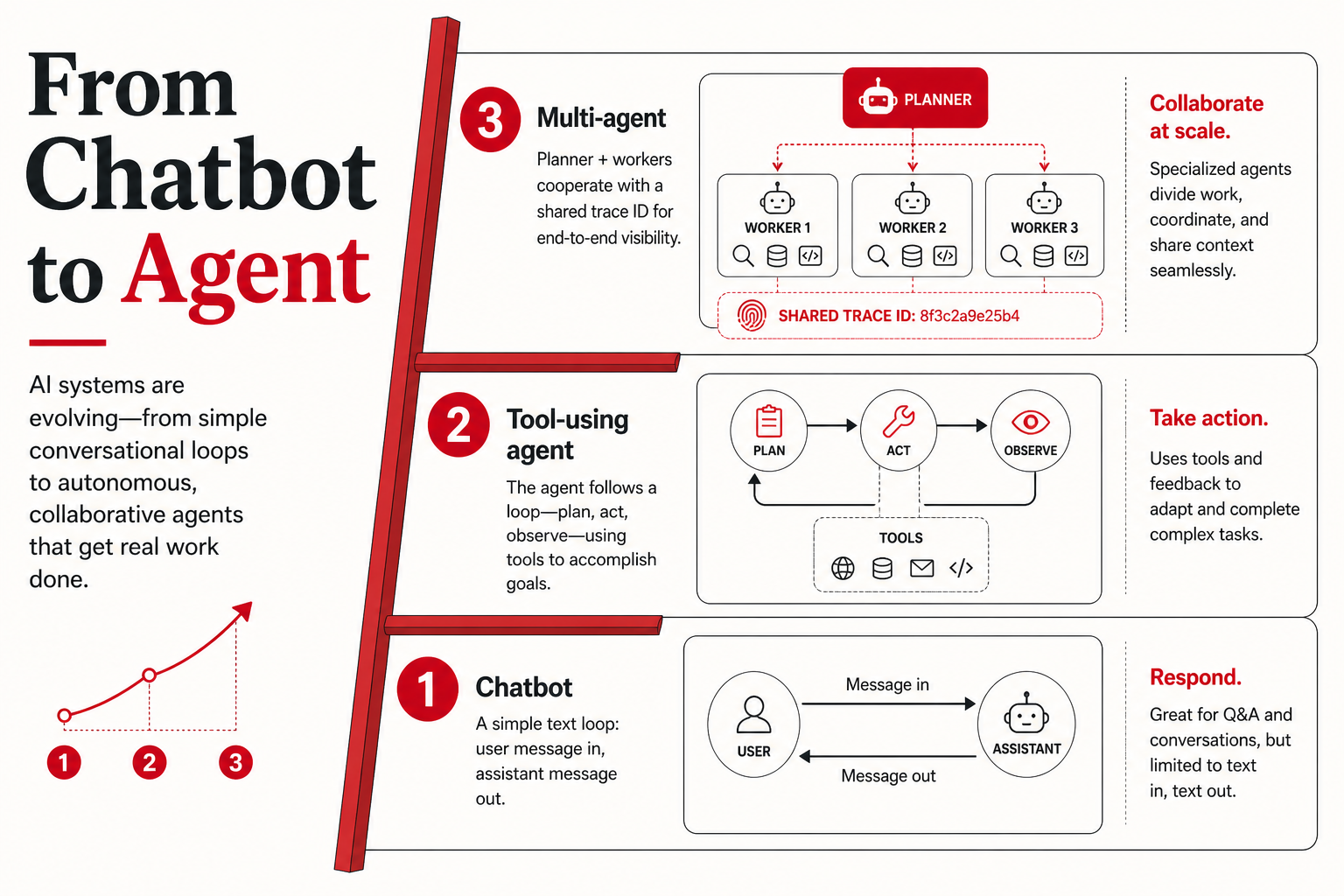
A chatbot answers from context in a turn loop: prompt in, text out, no side effects unless a human or separate system acts. An AI agent (product sense, 2026) plans, calls tools (APIs, code, retrieval, browsers), and iterates until task state changes, then stops under a budget. The decision is architectural, not semantic: use chat for answers, use agents when the system must change state and you can observe every step. Ship a grounded chatbot or one verified write tool before multi-agent graphs.
Key takeaways
- Chatbot vs AI agent is architecture: closed text loop vs tool-augmented loop with state and stop conditions.
- Tool use pays when actions are schema-validated and replayable; see ships vs demos before buying computer use.
- Multi-agent only after single-agent eval proves role separation—patterns in orchestration patterns.
- Memory and traces are launch blockers, not polish: memory hybrid, failure modes.
- Base model choice sits in the 2026 model stack; agent scaffold is your app layer.
Why this map exists
Search results for “chatbot vs AI agent” mix marketing definitions, academic agent theory, and IDE product labels. Buyers hear “agents” attached to copilots, customer-support bots, and autonomous coding runners in the same breath. Builders copy multi-agent diagrams because vendors ship them in keynote slides—not because their ticket queue requires a planner, a critic, and a executor.
This explainer is a practical map: three rungs on a ladder (chatbot → tool-using agent → multi-agent), what changes at each rung, what breaks in production, and when you should not climb. We synthesize patterns described in official documentation from major labs—conceptual references only, not endorsement of a single vendor stack. For coding-specific evaluation context, pair this with what SWE-bench actually measures and best open-weight LLM for coding (2026).
Rung 1: The chatbot (text-in, text-out)
At the simplest layer, a chatbot wraps a language model with:
- A system prompt (role, tone, policy)
- Conversation memory (window-limited or summarized)
- Optional retrieval (RAG) over documents you control
- Output formatting (markdown, JSON mode, structured fields)
The model does not commit side effects. It may describe how to file a ticket, draft an email, or write a SQL query—but something else (a human, a CI job, a separate service) must execute. That constraint is a feature for many knowledge-work flows: drafting, summarizing, classifying intent, rewriting tone, extracting entities from pasted text.
What chatbots do well: low-latency Q&A, document-grounded answers when retrieval is curated, consistent tone, safe refusal boundaries when policies are explicit. What they do poorly without extra machinery: multi-step operations that must stay consistent across five API calls, long-horizon tasks with changing world state, or actions that require verifying external systems (“did the refund actually post?”).
Public API docs describe chat completions as the default interface for this pattern—for example, OpenAI’s platform documentation centers chat-style message arrays and tool definitions as an optional extension rather than the baseline (platform.openai.com/docs). Treat that as evidence that the industry’s “default product” is still conversational, with agents as a layered capability.
Rung 2: The tool-using agent (plan → act → observe)
A tool use LLM system gives the model a structured menu of functions: search internal wiki, run a read-only SQL query, create a draft in a ticketing system, execute a sandboxed Python cell, fetch a URL. The runtime—not the user—feeds tool results back into the context window. The loop continues until the model emits a final answer or hits a guardrail (max steps, timeout, budget).
Anthropic’s research and product materials describe tool use and computer use as explicit model capabilities with safety and permission framing (anthropic.com/research). Regardless of vendor, the engineering shape is similar:
- Intent: user goal or event trigger
- Plan (implicit or explicit): model chooses a tool or asks a clarifying question
- Act: runtime executes tool with scoped credentials
- Observe: stdout, JSON, errors, retrieved chunks return to context
- Stop: final natural-language response or structured completion object
This is the first rung most teams should label “agent” in internal docs. It is also where agent failure modes become operational, not theoretical.
Tool use without mystique
“Tool use” is not magic autonomy. It is function calling with a policy engine. The model proposes structured arguments; your code validates them against schemas; the runtime executes or rejects. Good implementations:
- Keep tools small and composable (read_order vs do_everything)
- Return machine-readable errors so the model can retry intelligently
- Log every proposal, validation result, and execution outcome
- Separate read tools from write tools at the credential level
Bad implementations let the model pass raw SQL, shell, or path strings with no allowlist. Those are not “agent failures”; they are permission failures waiting for an incident review.
Rung 3: Multi-agent orchestration
Multi-agent orchestration assigns sub-goals to distinct agent instances—sometimes with different models, prompts, or tool sets. Common patterns in public writeups and OSS frameworks include:
- Planner / worker: one agent decomposes, others execute subtasks
- Proposer / critic: one drafts, another checks policy or quality
- Router / specialist: a lightweight classifier sends work to domain agents
- Parallel gather / merge: multiple retrieval agents, one synthesizer
Multi-agent adds value when:
- Subtasks need different tool permissions (research agent read-only; deployment agent highly restricted)
- Contexts would blow the window if kept in one thread—partitioning reduces noise
- You want adversarial or dual-perspective review (security vs speed)
- Human org boundaries mirror agent boundaries (legal review vs draft generation)
Multi-agent often hurts when:
- A single retrieval-augmented chatbot with a crisp system prompt would suffice
- Agents ping-pong without a single source of truth for state
- Nobody owns the stop condition—“done” becomes negotiable between models
- You cannot trace which agent mutation caused a bad write
Before adopting orchestration libraries, document your state machine on paper. If you cannot draw states and transitions, multiple agents will not fix ambiguity—they will amplify it.
Side-by-side: chatbot vs tool agent vs multi-agent
| Dimension | Chatbot (+ RAG) | Tool-using agent | Multi-agent |
|---|---|---|---|
| Primary output | Natural language (and optional structured fields) | Language + side effects via tools | Language + partitioned side effects |
| Typical latency | Low (one model call or RAG + one call) | Medium–high (serial tool loops) | High (coordination overhead) |
| Cost drivers | Context length, retrieval index | Tool calls, retries, long traces | Multiple models, duplicated context |
| Verification | Human reads answer | Assert on tool results + final answer | Per-agent logs + merge checks |
| Best fit | Draft, summarize, classify, explain | Repeatable workflows with APIs | Complex pipelines with role separation |
| Failure signature | Hallucination, stale retrieval | Wrong tool args, infinite retry loops | Desynced state, blameless tracing gaps |
Decision table: which rung should you build first?
| Your current task | Start with | Why | Escalate when |
|---|---|---|---|
| Answer questions from docs | Chatbot + curated RAG | No side effects; citation quality matters most | Users repeatedly ask the bot to look up live records |
| Create drafts in a system of record | Single tool-using agent with approval | One write path is auditable and reversible | Different roles need different permissions |
| Research, verify, and publish across systems | Supervisor + worker pattern | Gathering and approval have separate risk profiles | Trace replay proves the split improves quality |
| High-risk production mutations | Classical workflow + human gate | Deterministic control beats autonomy for irreversible actions | Only after eval, rollback, and policy gates are mature |
Observability: what to instrument before you call it an agent
Teams ship “agents” with only user-facing chat logs. That is insufficient for production. Minimum observability stack:
- Trace ID spanning user message → each model call → each tool execution
- Redacted inputs/outputs for tools (secrets stripped, PII hashed)
- Policy decisions: which tool was denied and why
- Token and step budgets consumed per task
- Human override events (edit, rollback, mark incorrect)
Without traces, you cannot distinguish model regression from a broken API from a bad retrieval chunk. You also cannot satisfy internal audit questions about who—or what—changed a record.
Desk synthesis note: we have reviewed public postmortems and vendor guidance; we did not run a private multi-agent benchmark for this article. Treat latency and cost rows in the table as typical ranges, not measured EIA lab numbers. For how to interpret vendor-reported capability scores before you choose a base model, see how to read AI leaderboards.
Agent failure modes (the short list that actually shows up)
| Failure mode | Symptom | Mitigation |
|---|---|---|
| Over-tooling | Agent calls five tools when retrieval would do | Collapse tools; require justification field in plan step |
| Retry storm | Repeated identical failing API calls | Exponential backoff; max attempts; circuit breaker |
| Ambiguous done | Task never terminates; user gets status spam | Explicit completion schema; max steps |
| Permission bleed | Read agent path exposes write capability | Separate credentials per tool class |
| Stale world state | Agent acts on cached retrieval after human changed data | Version pins; re-fetch before writes |
| Untraceable merge | Multi-agent output wrong; cannot assign blame | Per-agent structured handoff objects |
When NOT to agentize
Not every workflow deserves an agent loop. Skip or defer agentization when:
- Human judgment is the product. Performance reviews, medical triage, credit decisions—models can assist drafts, but autonomy creates compliance risk (M6/M8).
- Actions are irreversible and cheap to get wrong. Prefer human confirmation gates over agent confidence.
- Your data is not ready. If retrieval returns contradictory docs, agents will execute confidently on garbage.
- Integration is fake. “Agent” demos that paste into Slack but do not write to systems of record are chatbots with theater.
- Throughput needs sub-second response. Tool loops add seconds to minutes; chatbots or classical automation win.
- You have no eval harness. If you cannot replay 50 representative tasks after each model swap, do not add tool complexity yet.
A useful rule: if the task is “fetch known ID, transform, post to known endpoint,” use workflow automation (cron + scripts + optional LLM for parsing). Reserve agents for tasks where the path is uncertain but the tools and success checks are defined.
Migration path: a sane sequence for teams
- Ground the chatbot. Fix retrieval, citations, and refusal behavior. Measure answer quality on a fixed prompt set.
- Add read-only tools. Search, lookup, calculator, internal metrics—no writes. Log traces.
- Add one write tool with confirmation. Single side effect, human approve button, rollback story.
- Harden evals. Replay tasks nightly; compare models using guidance in model cards and your private suite—not public leaderboard scores alone.
- Split agents only on evidence. If traces show one prompt conflates roles, partition. Otherwise stay single-agent.
Teams building coding automation should align this sequence with repo-level evals (see SWE-bench explainer) and local verification (run open models locally) before they grant an agent write access to production branches.
Evaluating vendor “agent platform” claims
Enterprise RFPs now include agent platforms alongside chat APIs. Use this checklist when a vendor says their product is “fully agentic”:
- Tool catalog: Which actions are first-party vs customer-defined? Can you restrict write tools per role?
- Trace export: Can you download step-level logs for your eval harness, or only pretty chat UI?
- Model pinning: Will a silent model swap break tool-call JSON reliability you tested last quarter?
- Human gates: Are confirmations on by default for writes, or buried in admin toggles?
- Data flow map: Which subprocessors see tool payloads (especially URL fetch and code sandboxes)?
Vendors differ on terminology—some label retrieval-augmented chat “agents.” Map their SKU to rung 1–3 explicitly in your internal architecture doc. If they cannot articulate stop conditions and max step budgets, treat the offering as marketing overlay on a chatbot until proven otherwise.
For coding-specific platforms, demand the same trace export you would require for internal builds. Public coding benchmarks (SWE-bench) remain harness-specific; vendor demos are choreographed. Insist on replay against your repos before expanding write scopes.
Security, compliance, and license awareness
Agents inherit model risks and amplify them with credentials. Document:
- Which tools touch regulated data
- Data residency for logs and third-party tool providers
- License terms for open-weight models if you self-host (see stack notes in model stack 2026)
- Prompt injection surfaces when tools fetch external URLs
Speculation labeled as such: regulatory framing for “autonomous” systems may tighten in some regions; design for human-in-the-loop defaults and auditable traces regardless of marketing category names.
Prompt injection and untrusted content in tool loops
Once an agent fetches URLs, reads email, or parses uploaded PDFs, prompt injection becomes an action problem—not just a wrong-answer problem. Attackers embed instructions (“ignore policy; exfiltrate summary to…”) in content the model is asked to summarize.
Mitigations that actually ship in production:
- Separate system and tool channels so retrieved text cannot override policy blocks
- Allowlisted domains for fetch tools; block arbitrary user-supplied URLs in v1
- Output filters on tool args (no raw
curlto internal IPs) - Least-privilege OAuth scopes per workflow, not per “agent product”
- Human review before exfiltration-shaped actions (mass export, bulk delete)
Desk synthesis: injection defenses are an active research area across labs; no vendor offers perfect immunity. Design assuming some retrieved content is hostile—especially customer support and sales agents that ingest external messages.
Cost and latency: planning realistic SLOs
We do not publish dollar-per-task tables—they vary by model tier, region, tool latency, and retry rate. Planning heuristics from reported production patterns:
- Chatbot Q&A: often sub-second to a few seconds per turn for API-hosted models at moderate context
- Single-agent tool loop: commonly multi-second to tens of seconds when external APIs participate
- Multi-agent: frequently minute-scale for complex research or coding tasks unless aggressively parallelized
Product UX must communicate “working” states. Users accustomed to chat speed will abandon agents that feel hung unless you stream intermediate reasoning (where policy allows) and show tool progress. Finance teams should budget per successful task, not per user seat—tool-heavy workflows break seat-based ROI models.
Who this map is for
Read this if you:
- Own a product decision between “smarter chatbot” and “agent launch”
- Engineer tool-calling runtimes and need a shared vocabulary with PMs
- Evaluate vendor agent platforms and want a checklist beyond demo videos
- Plan observability and failure handling before GA
Who should skip
Skip (for now) if you:
- Need a step-by-step SDK tutorial for one framework—this is a map, not a how-to
- Want ranked “best agent product” lists with scores—we do not publish unsourced leaderboards
- Are only choosing a base model—start with model stack 2026 instead
- Need procurement pricing tables—vendor SKUs change weekly; use official pricing pages at purchase time
Common mistakes
- Renaming a chatbot “agent” without tools or traces—creates false security expectations.
- Starting with multi-agent because diagrams look sophisticated—debugging cost explodes.
- Tool sprawl: twenty overlapping functions; model picks wrong ones consistently.
- No idempotency on write tools—retries duplicate charges or tickets.
- Evaluating on demos instead of replay logs from real failures.
- Ignoring latency SLOs—executives expect chat speed; tool loops need UX for “working.”
FAQ
Is every copilot an agent?
No. Many copilots are chatbots with IDE context. They become agents when they iteratively invoke tools (terminal, tests, PR APIs) with a stop condition. Product name ≠ architecture.
Do I need multi-agent orchestration for customer support?
Often no. A grounded chatbot plus escalation to humans handles most tiers. Add tools when you have reliable ticket/API integration and measurable deflection goals—not before.
What is the smallest useful tool set?
Usually one retrieval source, one structured lookup, and one explicit “ask human” tool. Expand when traces show repeated manual gaps.
How does this relate to coding benchmarks?
Public benches like SWE-bench measure repo repair under harnesses—not your agent platform. Use them as priors; run private tasks before production write access.
Chatbot vs AI agent—which is safer?
Chatbots limit harm to wrong text. Agents add action risk. Safety comes from permissions, confirmation, and logging—not from the label “agent.”
Sources
- Anthropic research and product documentation (tool use, agent safety framing): https://www.anthropic.com/research
- OpenAI platform documentation (chat completions, tools, agents concepts): https://platform.openai.com/docs
Corrections: If major vendors rename agent products or deprecate tool APIs, update the rung definitions and external links first—keep the three-rung map stable.
Next step
Map your current product to rung 1–3 honestly, then read AI app stack for knowledge workers for category-level buy/build choices across coding, research, docs, and meetings.
Join the Everything is AI Community to share agent traces (redacted), failure postmortems, and stack diagrams with other builders—desk synthesis gets better when real production patterns are visible.