Quick answer
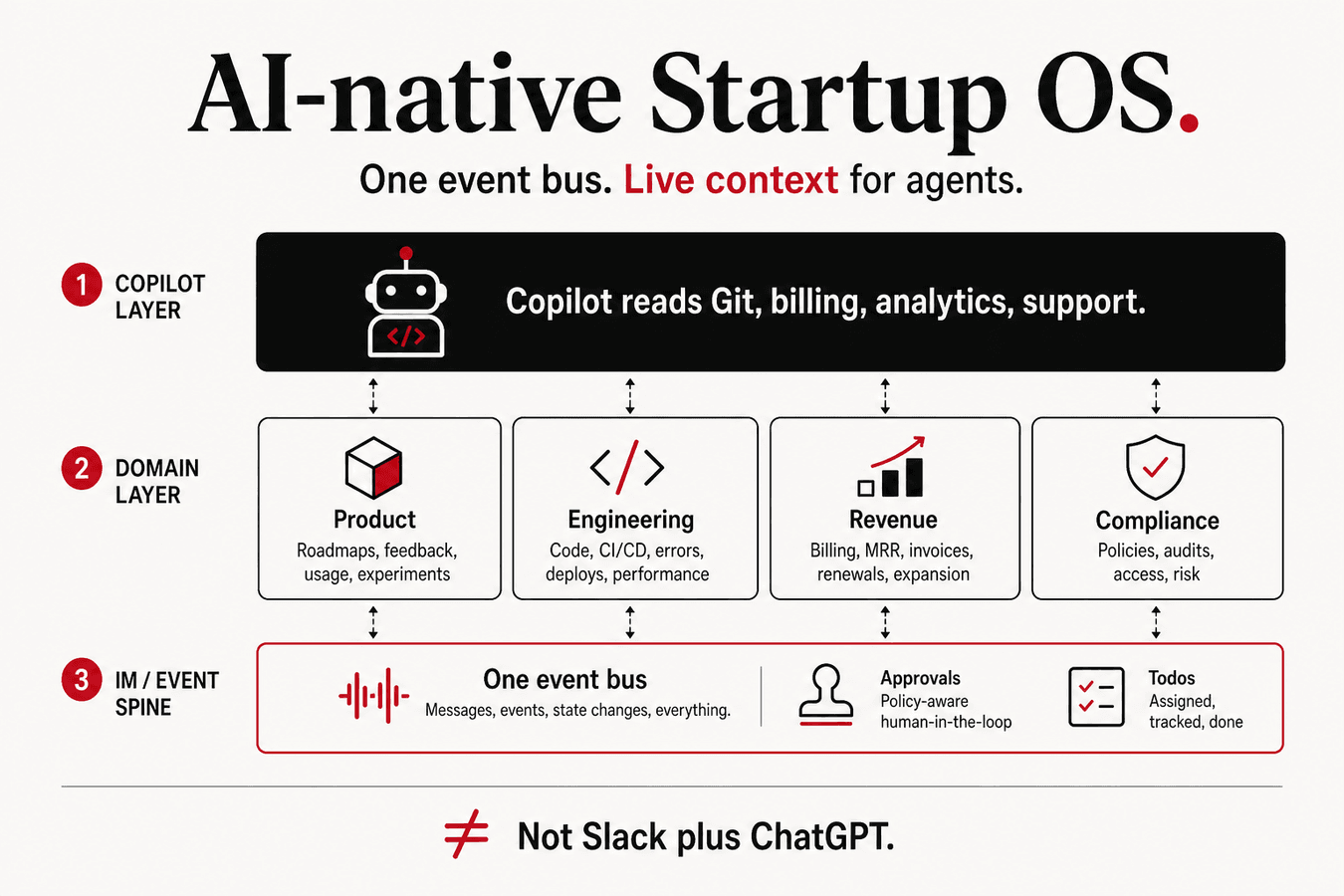
An AI-native Startup OS is not “Slack plus ChatGPT.” It is a single workspace where messaging, approvals, product analytics, billing, error tracking, and compliance share one event bus—so AI agents read live business context instead of pasted screenshots. For AI SaaS companies, the OS must also meter inference usage, gate model rollouts, and tie incidents to support tickets. Explore a demo stack at CorpIM Startup OS: open Guide for stage playbooks, Studio for product/engineering/revenue loops, and Startup Copilot for cross-system answers.
Key takeaways
- Tool sprawl kills AI ROI: agents without CRM, Git, and metrics context invent priorities instead of citing them.
- An AI-native OS wires events → IM → todos → write-back, not isolated dashboards humans stitch by hand.
- Stage-based operating guides (validate → first revenue → enterprise) beat generic “AI tips” that ignore runway and buyer stage.
- Open connectors (PostHog, GlitchTip-class, Lago, Chatwoot) keep data residency and cost predictable while agents stay portable.
- Copilot value equals agentic operations—cross-loop decisions with citations—not another chat surface in the dock.
Who this is for
- Founders running AI SaaS or AI-heavy B2B products on roughly 5–50 people.
- CTOs tired of Slack + Notion + Sentry + Stripe + “someone’s spreadsheet” as the real system of record.
- RevOps leaders who need churn signals beside support queues, not in a separate BI tab.
- Ops leads preparing for first enterprise pilots who need compliance evidence beside engineering metrics.
- Product leads shipping copilots who must measure adoption and cost in the same weekly narrative as retention.
Who should skip
- Solo hackers with one repo and no customers—start with Git and a metrics tool; an OS is premature.
- Enterprises with a mandated Microsoft or Google suite and no integration budget—adapt patterns, do not rip out governance.
- Readers hunting a ranked list of chatbots—see AI copilot vs chatbot for startups instead.
- Teams that only need a customer-facing docs assistant—build RAG on a static KB, not a full operating system.
- Founders who want a magic “AI CEO” without wiring billing or errors—connectors first, models second.
What “AI-native” means here (and what it does not)
Search results often treat “AI-native” as a marketing label for any product with a chat box. For Startup OS Desk, the phrase has a narrower operational meaning: the company’s operating surface assumes agents will read live systems, and those systems are designed so agents can do so safely.
That implies three design commitments:
- Shared identity and tenancy. Customer IDs, release tags, and incident IDs resolve the same way in analytics, billing, support, and Git.
- Event-first integration. Tools emit events (usage, errors, deploys, ticket status) into a hub that IM and agents consume—humans are not the permanent ETL layer.
- Human-gated writes. Agents propose; people approve refunds, merges, and customer messages. Read-heavy agents with cite-or-abstain rules beat write-happy bots.
What it does not mean: replacing your CRM tomorrow, buying every open-source tool in a blog list, or claiming a vendor is “the only AI-native OS.” This article is a pattern description. CorpIM is one demo of the pattern; the pattern travels.
Customer-facing AI (your product’s inference path) is related but separate. You still need metering, gradual rollout, and observability for that product path—see gradual rollout for models and prompts and from chatbot to agent. The Startup OS is how the company runs while that product ships.
Three layers of an AI-native OS
1. Communication and approvals
Enterprise IM patterns—channels, bots, approvals—remain the spine. OA-style flows (leave, contracts, procurement, access requests) should surface as actionable cards in chat, not as email detours that die in inboxes.
Global startups often reject region-locked IM suites for data residency or pricing reasons. A self-hosted or cloud-hosted hub with open connectors is the neutral layer: one place for “needs approval,” one place for “incident owner,” one place for “founder digests.”
The decision test is simple: if a founder asks “what blocks release this week?” and the answer requires opening five tabs, your communication layer is not connected to execution data. Chat without connectors is still chat.
Approvals also create the audit trail auditors and enterprise buyers expect. A “yes” on a refund or a production flag flip should leave a durable record tied to a user and a timestamp—not a disappearing Slack reaction.
2. Four operational loops
AI SaaS teams run four loops in parallel. An OS that only covers engineering will look healthy while revenue silently dies—and the reverse is also true.
- Product loop — adoption, retention, feedback, feature flags. Typical open references: PostHog documentation for analytics and flags; Plane-class issue tracking; Fider-class feedback; Unleash-class flag servers.
- Engineering loop — errors, traces, security scans, preview environments. GlitchTip-class error tracking, SigNoz-class observability, CI gates that block broken main.
- Revenue loop — support, metering, payments, CRM light. Chatwoot-class support, Lago docs for usage metering, Stripe usage-based billing for money movement.
- Compliance loop — cap table hygiene, SOC 2 evidence collection, investor updates when you sell upmarket. See SOC 2 checklist for AI SaaS.
In the CorpIM Studio demo, these loops share todos and IM channels so a retention dip, a 500 error spike, and a churn-risk account appear in one narrative instead of three weekly meetings.
The loops are not org charts. A five-person team still runs all four; ownership just concentrates on fewer humans. The OS’s job is to make the loops visible without requiring a PMO.
3. Agentic layer
Startup Copilot reads connectors—Git, CI, product analytics, billing, GRC—and answers operational questions: what to ship this week, root cause for production errors, which trials are at churn risk. That is agent architecture applied to company operations, not customer-facing chat alone. Boundaries versus FAQ bots are covered in AI copilot vs chatbot for startups.
Without the agentic layer, you still have a useful integrated dashboard. With it, cross-system questions become answerable in one prompt instead of a 45-minute tab hunt—if connectors and ACLs exist. Buying a model before wiring Lago and error tracking is the most common failure we see in desk synthesis.
Separate Dev Agent (code/CI) from Startup Copilot (company ops). Merging them into one unbounded agent usually produces either unsafe write paths or vague answers that cite nothing.
AI-native vs “AI features sprinkled on SaaS”
| AI sprinkle | AI-native OS | So what? |
|---|---|---|
| “Summarize this doc” button | Agent reads ticket + error + deploy context | RCA time drops; fewer wrong ship priorities |
| Separate AI admin panel | Events in IM with approve/remediate actions | Incidents get owners, not Slack noise |
| Monthly manual investor deck | IR draft from live MRR and WAU | Numbers match data room; less founder burnout |
| Model swap in code only | Gradual rollout with flags and monitoring | See gradual rollout guide |
| Seat pricing with no usage meter | Lago + Stripe metering at API edge | See billing for AI API usage |
| “Users don’t like AI” narrative | Prompt-to-success funnel in analytics | See AI feature adoption metrics |
| SOC deck from memory | Evidence next to engineering metrics | Diligence mismatch shrinks |
Use the table as a procurement filter. If a vendor sells “AI” but cannot show how events land in IM and how agents cite source systems, you are buying a sprinkle.
Why tool sprawl breaks AI ROI
Startups do not fail to adopt AI tools because models are weak. They fail because context is fragmented. An agent that sees only a Notion page will invent MRR. An agent that sees only Sentry will invent business priority. An agent that sees only Stripe will invent engineering root cause.
Humans compensate by becoming the integration layer: copy MRR into a Friday email, paste stack traces into a support reply, screenshot PostHog for the board. That works until volume or fatigue breaks it. AI-native design treats that compensation as a bug.
Three concrete failure modes from desk synthesis:
- Priority hallucination. Copilot ranks features by chatter volume because retention events never reached the hub.
- RCA theater. The agent names a “likely root cause” without a deploy ID or error fingerprint—confident prose, zero evidence.
- Margin blindness. Product celebrates AI feature usage while finance discovers unmetered inference burned the month’s GPU budget.
Fixing these is not a prompt engineering problem. It is an OS wiring problem: shared IDs, event emission, ACL-aware retrieval, and human approval on writes.
Operating Guide: stages and playbooks
Tools without rhythm create anxiety. An AI-native OS should ship stage templates (validate, first revenue, repeatable sales, enterprise-ready) with:
- One north-star metric and two guardrails per stage.
- Weekly cadence (daily error scan, Monday retention review, Wednesday release gate)—detailed in AI startup weekly operating rhythm.
- Runnable playbooks (first customer, incident, churn save, release, fundraise).
Running S0 rituals at S3 wastes calendar; skipping S1 billing churn checks while chasing enterprise logos burns runway. Pick stage first, then tools.
| Stage | North-star example | OS investment priority | Defer |
|---|---|---|---|
| S0 Validate | Learning interviews / waitlist quality | Git + basic analytics + shared notes | Full GRC, complex metering |
| S1 First revenue | MRR / paying accounts | Billing meter + support + error triage | Heavy IR automation |
| S2 Repeatable | NRR / expansion + retention | Event hub, flags, Copilot for RCA/churn | Custom ERP |
| S3 Enterprise-ready | Enterprise pipeline + audit readiness | SOC evidence, ACL depth, IR from live metrics | Rebuilding IM from scratch |
In CorpIM, pick a stage under Guide, run a playbook checklist, and sync connector events to see the loop end-to-end. The Guide is not content marketing; it is the filter that stops pre-revenue teams from staring at NRR dashboards.
Open-source stack map (demo reference)
Teams self-hosting for cost or compliance often assemble a composable stack. Names below are illustrative references from public docs ecosystems—not a ranked “best of” list:
- Product: PostHog, Plane, Unleash, Upptime
- Engineering: Gitea, Drone CI, GlitchTip, SigNoz, Outline
- Revenue: Mautic, Chatwoot, Lago, Stripe
- Compliance: Captable-class tools, Probo-class GRC, IR templates
Pair with self-host vs API TCO when deciding which layers to host yourself versus buy as SaaS. Inference hosting and ops hosting are different TCO problems; do not collapse them into one spreadsheet row.
Composable does not mean “install fifteen tools on day one.” Start with the loop that is currently failing (usually revenue metering or error triage), then expand. An empty event hub with no producers is theater.
Event bus and write-back: the non-sexy core
The differentiating engineering of an AI-native OS is boring: normalize events, attach them to todos and channels, and allow controlled write-back.
Normalize. A Stripe failed payment, a Lago quota warning, and a Chatwoot “billing surprise” ticket should share a customer key. Without that key, Copilot cannot answer churn-risk questions honestly.
Surface. Events become IM cards and todos with owners. A HIGH error without an owner is noise. A HIGH error with a release tag and a support ticket ID is work.
Write-back. Agents draft; humans approve. Examples: create a todo, draft an investor paragraph with footnotes, propose a feature-flag rollback. Auto-refund and auto-merge without gates are how you earn incident postmortems.
This is closer to classic systems integration than to “prompt engineering.” Treat prompts as the last mile.
Minimal event schema (desk pattern)
You do not need a perfect enterprise event taxonomy on day one. You need a small schema that every connector can populate:
event_type— e.g.error.high,billing.payment_failed,usage.quota_80,deploy.failed,ticket.billing_surprisetenant_id/customer_id— stable join keyrelease_idorgit_shawhen engineering-relatedseverity— UTC ISO string; agents must show as-ofsource_system— PostHog, Lago, Stripe, GlitchTip-class, Chatwoot-classdeeplink— URL back to the record humans can verifyowner_hint— role or user if known
If a connector cannot supply a deeplink, treat its payload as weak evidence. Copilot answers that cannot be clicked through will not survive founder distrust.
90-day adoption sequence (practical)
Desk synthesis favors a sequenced rollout over a big-bang “OS implementation.”
- Days 1–14: Pick stage (S0–S3). Write the weekly rhythm doc. Stabilize shared customer IDs across billing and support.
- Days 15–30: Wire the failing loop first—usually errors or metering. Land events in IM with owners.
- Days 31–60: Add product analytics join for retention and AI feature adoption. Ship one cite-or-abstain Copilot question (RCA or churn risk).
- Days 61–90: Add release-gate checklist automation and IR draft footnotes. Begin compliance evidence collection if selling upmarket.
Skip Copilot until at least two connectors produce trusted events. Skip GRC theater until a real questionnaire forces it—but do not skip metering if AI COGS already varies wildly by tenant.
Anti-patterns in “AI OS” vendor pitches
- Chat UI first, connectors “coming soon.”
- No shared customer ID story across billing and support.
- Auto-write actions without approval and audit.
- One dashboard for all stages with no north-star filter.
- SOC PDF uploaded once, never linked to live evidence.
- Claimed “AI-native” because the product embeds a model—without an event hub.
Bring the sprinkle-vs-native table to vendor calls. Ask them to walk a single incident from error → deploy → ticket → customer. If they cannot, you are buying a chat skin.
AI product discipline lives inside the same OS
Your customer-facing AI features need the same loops:
- Adoption: measure prompt-to-success, not vanity opens—measure AI feature adoption.
- Cost: meter at the edge and bill with hybrid quotas—how to bill for AI API usage.
- Risk: roll out models and prompts gradually with flags and monitors—gradual rollout.
- Architecture: know when you crossed from chatbot to agent—practical map.
Teams that treat “product AI” and “company AI” as unrelated projects usually discover the gap during diligence: usage logs without retention policy, or a support bot that can see billing data it should not.
Compliance is a loop, not a PDF
Enterprise buyers ask for trust evidence while your team is mid-incident. If SOC artifacts live in a folder nobody updates, you will invent status under pressure.
The AICPA SOC for Service Organizations overview is the public starting point for what SOC 2 means. Map controls to live systems: access reviews, change management, vendor inventory, backup drills. Put evidence collection next to engineering metrics so Wednesday release gates and quarterly compliance reviews share owners.
Practical checklist for AI SaaS specifics (model vendors as subprocessors, prompt logs, retention): SOC 2 checklist for AI SaaS.
Decision table: buy, assemble, or wait
| Situation | Prefer | Avoid |
|---|---|---|
| <10 design partners, no paid usage variance | Minimal stack + weekly rhythm doc | Full Copilot + GRC suite |
| Paying customers, AI cost variance by tenant | Metering + support + error hub | Seat-only pricing with no edge meter |
| Weekly cross-system questions burning founder time | Connectors + Copilot with citations | Generic ChatGPT without ACL |
| First enterprise security questionnaire | Evidence loop + vendor list | Marketing PDF with no system links |
| Strong Microsoft/Google mandate | Pattern on top of suite APIs | Rip-and-replace IM for ideology |
Common mistakes when building an ops stack
| Mistake | Why it fails | Fix |
|---|---|---|
| Buy Copilot before connectors | Model invents MRR and RCA | Wire billing + errors first; Copilot second |
| 15 tools, zero event bus | Humans are the integration layer | IM todos + webhook hub normalize events |
| Same dashboard for all stages | Pre-revenue founders stare at NRR | Stage-filtered Guide (S0–S3) |
| AI feature without adoption metrics | “Users don’t like AI” narrative | Measure prompt-to-success funnel |
| Enterprise SOC deck from memory | Diligence mismatch | SOC 2 checklist + live evidence |
| Merge Dev Agent and Startup Copilot | Unsafe writes or vague ops answers | Split scopes; human gate on writes |
| Self-host everything on day one | Ops load exceeds product progress | TCO by layer; host where residency or margin forces it |
CorpIM demo path (3 steps)
- Guide — Select S1 “first revenue”; review north-star MRR and top-3 todos.
- Studio — Open Revenue loop; trace a support ticket linked to a billing churn signal.
- Startup Copilot — Ask: “Which trial accounts are at churn risk?” and note cited sources.
Live demo: https://www.romewayai.com/corp-im/. Soft next step: walk Guide → Studio → Copilot once with your real weekly questions in mind, then decide which connectors you must wire first.
Worked example: first 30 days without boiling the ocean
Illustrative S1 team (desk synthesis): six people, first paid logos, five SaaS tools, no shared incident channel. Goal is an AI-native operating surface—not a platform rewrite.
Week 1–2: Pick IM as the hub. Wire billing (Stripe or Lago) and errors (GlitchTip/Sentry-compatible) so two critical loops emit events. Define stage S1, north-star (e.g. MRR), and three owners. No Copilot yet.
Week 3: Add one product flag + adoption events for the main AI feature. Wednesday release gate uses flags, not hope. Document rollback for model/prompt pins per gradual rollout.
Week 4: Turn on Startup Copilot in read-only mode against those connectors. Ask one question—“which trials show churn risk?”—and reject answers without citations. Create todos only with human approval. Soft-walk the same Guide → Studio → Copilot path in CorpIM to see the shape before you buy more tools.
What you explicitly skip in day 30: full SOC theater, multi-agent swarms, and replacing accounting. The OS earns trust when events become owned work—not when the slide says “AI-native.”
What we did not test
This article is desk synthesis. We did not run a controlled vendor bake-off, publish latency benchmarks, or claim ROI percentages for named companies. Tool names are illustrative of public documentation ecosystems (PostHog, Lago, Stripe, AICPA). Your connector list should match your compliance and hosting constraints.
FAQ
Is an AI-native Startup OS the same as an ERP?
No. ERPs optimize finance and inventory for mature ops. A Startup OS optimizes cross-loop decisions for small AI SaaS teams: ship vs fix vs sell vs comply—with agents that read live signals. You may still use light accounting tools; the OS does not replace GAAP process.
Do we need self-hosted tools to be “AI-native”?
Not required. The pattern is composable connectors + event hub. Self-host when data residency, margin, or auditor questions favor it; use SaaS when speed wins. Revisit with a layer-by-layer TCO, not ideology.
When should we add Startup Copilot vs Dev Agent?
Dev Agent targets code/CI. Startup Copilot targets company ops (metrics, billing, incidents, IR). See copilot vs chatbot for architecture boundaries. Add Copilot only after at least two critical connectors produce trustworthy events.
How does this relate to customer-facing AI?
Your product’s inference stack is separate—but billing, observability, and rollout discipline for customer AI should live in the same OS loops as your own ops copilot. Fragmenting those disciplines creates diligence and margin surprises.
What is the minimum viable Startup OS?
Shared identity keys across analytics, billing, and support; an IM surface with owned todos; edge metering if AI cost varies by tenant; and a weekly rhythm that names owners. Copilot is optional until those pieces exist.
Sources and further reading
- PostHog documentation — product analytics and feature flags
- Lago documentation — open-source usage metering
- Stripe usage-based billing docs — metered subscriptions and overages
- AICPA SOC for Service Organizations — trust services criteria context
- Internal cluster: weekly rhythm, AI API billing, adoption metrics
Continue the semantic path
Next reads: AI copilot vs chatbot for startups, weekly operating rhythm, bill for AI API usage, and from chatbot to agent for product-side architecture.